진자는 이미 플라스크 다운받을 때 함께 다운되는 파이썬 전용 펨플릿 언어이다.
html은
<태그>안에 있는 글자를 문자열 그대로 렌더링하는 반면</태그>
진자는 html안에서 {{}}을 이용한다.
<태그>{{변수나 사칙연산 같은 것들이 들어가면 계산되어서 렌더링 된다.}}</태그>
<!DOCTYPE html>
<html>
    <head>
        <meta charset="utf-8">
        <title>Tae's website for flask</title>
    </head>
    <body>
        <h1>Hello~!☺️ This is TaeYu's Website</h1>
        <p>and i'm learning about flask!</p>
        <h3>{{3*7}}</h3>
        <h3>3*7</h3>
    </body>
</html>
1. 변수 와 키워드 인자 이용하기
예를 들어 랜덤정수를 뽑고 싶다면
flask파이썬 파일에 가서 랜덤모듈을 호출 후 사용하는 함수 안에 변수1로 불러오고
html안에 사용할 변수content1를 render_tempalte('파일이름.html',content1=변수1)와 같이 함수안에 인자로 넣어준 후
from flask import Flask,render_template
import random
app=Flask(__name__)

@app.route('/')
def at_home():
    a=random.randint(1,10)
    return render_template('index.html',content1=a)

if(__name__)=="__main__":
    app.run(debug=True)
<h3>Random : {{content1}}</h3>
변수를 활용한 또 다른 예로 데이트타임 불러와서 사용할 수도 있다.
import datetime

@app.route('/')
def at_home():
    c=datetime.datetime.now().year
    return render_template('index.html',year=c)

이와 같이 파이썬서버 파일에서 코드를 작성해서 값을 계산하거나 불러온 데이터를 변수에 저장해서 템플릿에 보내 랜더링할 수 있다.
2. 조건문,반복문 {% for / if %}
조건문 반복문은 서버파일에서도 쓸 수 있지만 html파일 안에서도 진자를 이용해서 쓸 수 있다.
1) 반복문
{% for i in list: %}
	<h1>{i}</h1>
{% endfor %}
2) 조건문
{% if (조건) == '값' %}
	<h1>{{데이터}}</h1>
{% endif %}
3.API
api 사용에 대한 자세한 정보는 추후 올리겠다
api를 이용해서 원하는 정보를 json()파일로 받고 그안에 딕셔너리와 리스트를 반복문을 통해 서버에 html 태그로 나타내보자
우선 내가 사용할 api는 google.books
https://developers.google.com/books
Google Books APIs | Google Developers
Access the full text of the Google Books repository.
developers.google.com
여기서 작가의 이름을 쿼리로 헤더안에 집어넣고 관련정보를 얻어서 필요한 정보만 가져오도록 하자
우선 서버파일안에 새로운 페이지를 만들고 author라는 변수를 만든다.
@app.route('/book/<author>')
def books(author):
    books_of_author=requests.get(f"https://www.googleapis.com/books/v1/volumes?q=inauthor={author}")
    infos = books_of_author.json()
    return render_template('books.html', author=author)
서버주소창에 '로컬서버url/book/작가이름'을 입력하면
api 주소 헤더 안에 작가이름이 변수author에 선언되서(?) 문자열 값으로 주어지고
해당하는 api정보를 가져올 수 있다.
가져온 api json파일을 살펴보면 데이터가 꽤나 복잡하게 얽혀있는데 트리구조를 잘 파악해서
원하는 정보를 가져온다.
나는 작가의 모든 저서의 제목과 발간일을 가져와서 각각의 리스트로 만들고
그 둘을 묶어서 하나의 딕셔너리로 만든다.
@app.route('/book/<author>')
def books(author):
    books_of_author=requests.get(f"https://www.googleapis.com/books/v1/volumes?q=inauthor={author}")
    infos = books_of_author.json()
    titles=[]
    dates=[]

    for i in range(len(infos['items'])):
        info_books=infos['items'][i]['volumeInfo']['title']
        titles.append(info_books)
        info_dates=infos['items'][i]['volumeInfo']["publishedDate"]
        dates.append(info_dates)

    dic_books={ title:date for title,date in zip(titles,dates)}
    return render_template('books.html', author=author, books=dic_books)
이렇게 서버파일에 만들어두고 이제 html로 넘어가서 jinja을 이용해보자
<!DOCTYPE html>
<html>
    <head>
        <meta charset="utf-8">
        <title>{{author}}'s book</title>
    </head>
    <body>
        <h1>{{author}}'s Book List</h1>
        {% for title,date in books.items() : %}
            {% if date.strip('-') >='20000101'%}
                <h2>{{title}}</h2>
                <p>{{date}}</p>
            {% endif %}
        {% endfor %}
    </body>
</html>
2000년 이후에 발행된 책의 제목과 발행일을 웹사이트에 나타낼 수 있다.
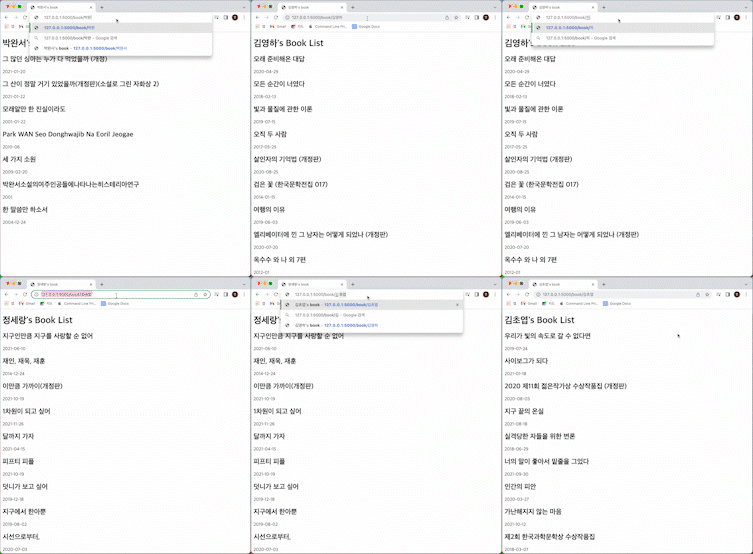
그런데 약간의 오류가 있다. 제목에 작가이름이 포함되거나 설명란에 작가이름이 포함되는 다른사람의 책도 같이 나온다.
이건 조금더 수정이 필요하겠다.
'TIL > Python' 카테고리의 다른 글
| [SQAlchemy][Flask-WTForms] 데이터베이스 이용하는 웹페이지 만들기 - 좋아하는 작품의 여러가지 정보를 리스트로 나타내기 (0) | 2022.06.15 |
|---|---|
| [Flask][Flask-WTF]간단한 사용 - 로그인 양식 (0) | 2022.05.31 |
| [Python][Flask] 플라스크 이용하기 - 3.렌더링 & 꾸미기 (0) | 2022.05.18 |
| [Python][Flask] 플라스크가 뭘까? -2. 디버깅 (0) | 2022.05.18 |
| [Python][Flask] 플라스크가 뭘까? -1 (0) | 2022.05.16 |


