
const a = "hello"
const b = "frontend"
1. 길이
a.length
b.length
Array.from(a).length
Array.from(b).length

console.log(a.length); //5
console.log(b.length); //8

console.log(Array.from(a).length); //5
console.log(Array.from(b).length); //8
Array.from(a).length 을 사용하는 이유 문자가 아닌 이모티콘을 문자취급하고 싶을 때 사용한다,
이모티콘은 4바이트로 표현되기 때문에 일반 .length을 사용하면 값이 2 이지만 실제로 차지하는 자리는 1이니까
4바이트 서러게이트쌍을 1로 표시하기 위해 array을 사용한다.
2. 공백 지우기
.trim()
const a = "    fresh fruits    ";
const b = a.trim();
console.log(a)
console.log(b);

const c = "the orange juice is \n";
const d = c.trim();
console.log(c)
console.log(d)

const e = "     grape. and  banana.   "
const f = e.trim();
console.log(e)
console.log(f);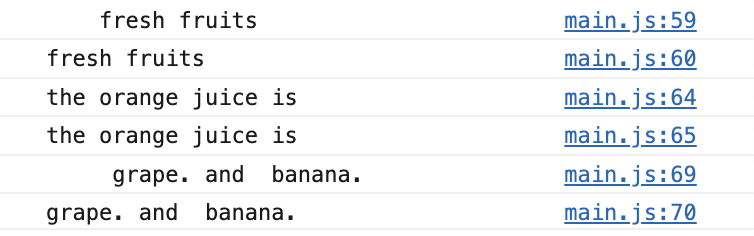
3. 검색하기
1.인덱스검색
const a="May 5 : children's day";

const b=a.indexOf('May'); //'May'가 시작되는 인덱스
const c=a.indexOf('children');
const d=a.lastIndexOf('y'); //y가 있는 마지막 인덱스
const e=a.indexOf("birthday");
const f=a.indexOf('m'); //대소문 구별
const g=a.indexOf('May',6); //인덱스 6 이후 검색인덱스 인덱스6이후 없으니 -1출력

console.log(a.length); //22
console.log(a,b,c,d,e,f,g)
2.부분검색 : includes/startsWith/endsWith boolean값으로 출력
const h=a.includes('day')
const i=a.startsWith('May')
const j=a.endsWith('may')

console.log(h,i,j) //true,true,false
3. 추출하기 :charAt[]
console.log(a.charAt()); //가장 처음 인덱스 문자 추출
console.log(a.charAt(8));//인덱스 8 문자 추출
//M,c
4. 자르기 : slice,substring,substr
const str1 ='totally forgot it'

str1.slice(a,b) //a인덱스부터 b인덱스 추출 *a,b는 정수
str1.slice(a) // a인덱스부터 끝까지 추출
str1.substring(a,b) //
str1.substing(a)//
str1.substr(a,b) //a에서 시작해 b개만큼 문자 추출
slice 은 음의정수를 사용할 수 있지만 substring은 음의 정수를 0으로 인식한다.
만일 a>b 인 정수인 경우 slice은 공백을 substring은 뒤집인 문자열 순서로 나온다.
str1.slice(3,5)// 'all'
str1.substring(3,5)//'all'
str1.substr(3,5)// 'ally '

str1.slice(4,1) // o
str1.substring(4,1) //'lato'
5. 교체하기 :replace
const str2='2022-05-13.svg'

console.log(str2.replace('05-13','05-05')) //2022-05-05.svg
console.log(str2.replace('-','')) //202205-13.svg
console.log(str2.replace(/-/g,'')) //20220513.svg
6. 나누기 : split
const url ='https://movie.daum.net/moviedb/main?movieId=127221'

url.split('?'); //['https://movie.daum.net/moviedb/main','movieId=127221']
url.split('/');// ['https:', '', 'movie.daum.net', 'moviedb', 'main?movieId=127221']
://movie 에서 공백을 확인 할 수 있다.
한글자씩 나눠서 array에 저장할려면 .split('')을 사용한다.
'WEB > Javascript' 카테고리의 다른 글
| [JS] 기본 배열 - 1편 (0) | 2022.06.27 |
|---|---|
| [JS] 기본문법 - 문자열 -정규표현식 (0) | 2022.05.13 |
| [JS] 기본문법-숫자 (0) | 2022.05.05 |
| [JS] 기본문법-boolean (0) | 2022.05.04 |
| [JS] 기본문법 -함수/ 조건문/ 반복문 (0) | 2022.05.04 |


